
How to Equip Brawlers in Anime Brawlers Simulator: Team Controls Explained
Where to manage equipped Brawlers in Anime Brawlers Simulator, and what Equip Best, Unequip All and manual swaps do to your active team.
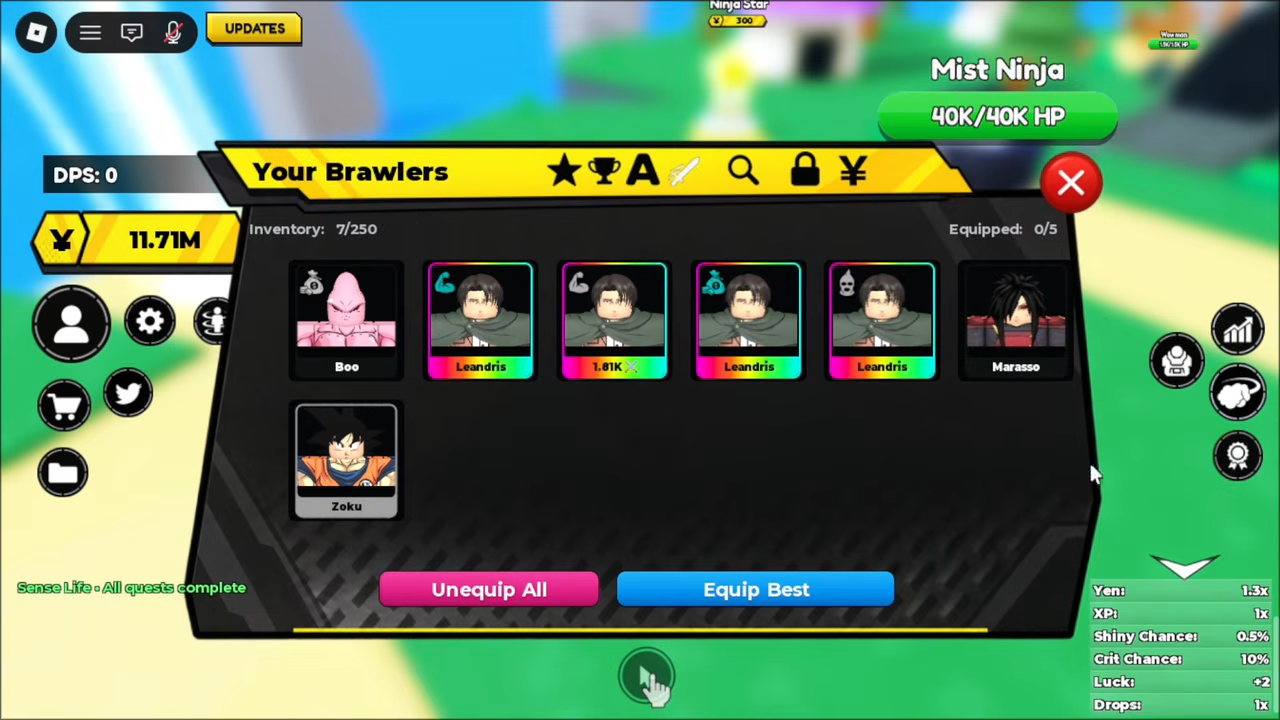
In Anime Brawlers Simulator, the place to manage your equipped Brawlers is the inventory screen titled 'Your Brawlers'. That single screen tracks both numbers that matter — how many Brawlers you own and how many are on your active team — and holds the controls that change your lineup: the 'Equip Best' and 'Unequip All' buttons, plus direct swaps of individual Brawlers.
Quick answer
You manage equipped Brawlers on the inventory screen titled 'Your Brawlers'. The 'Equipped' counter tracks your active team.
- Equip Best replaces your current lineup with the strongest Brawlers you own.
- Unequip All removes every Brawler from the equipped team.
- Manual swapping means taking unwanted Brawlers off the team and placing preferred ones in the open slots.
- You start with 5 equipped slots, and that cap can rise as you progress.

What's on the Your Brawlers screen
The screen is easy to recognize by its title. In one mid-session view it showed 'Inventory: 7/250' alongside 'Equipped: 0/5', with 'Unequip All' and 'Equip Best' as the two team buttons. Everything you need to reshape the lineup lives here:
| Element | What it means for your team |
|---|---|
| Inventory counter, e.g. 'Inventory: 7/250' | How many Brawlers you own against your storage cap. The count climbs as you summon, and newly pulled Brawlers appear in this list. |
| Equipped counter, e.g. 'Equipped: 0/5' | How many team slots are filled, out of how many you currently have. |
| Equip Best | Fills the team with your strongest Brawlers, replacing the previous lineup. |
| Unequip All | Removes every Brawler from the equipped team. |
The two counters capture a useful distinction: owning a Brawler and fielding it are different states. A fresh summon sits in your inventory until it is placed on the equipped team — which is exactly what these controls are for.
Equip Best: fill your team with your strongest
'Equip Best' is the fastest way to set a strong team. One press fills your equipped slots with the strongest Brawlers you own and drops whatever lineup you were running. One session shows the result clearly: after the player pressed it, his new picks came onto the team straight away, replacing the Brawlers he had out before.
Because it picks from your current roster, it's worth running again once your roster improves — say, after a new summon or a stronger unit enters the mix — so the team reflects your best options.
Keep in mind that it simply picks your strongest: it won't necessarily keep a specific character you personally want to field. That same player immediately planned to add his Gom on top of the auto-picked team, which is where the manual controls come in.
Unequip All: clear the team and start fresh
The other bulk button, 'Unequip All', removes every Brawler from the equipped team in one go. It's the clean-slate option: rather than patching a lineup piece by piece, you empty it and place Brawlers back exactly the way you want. With nothing fielded, the Equipped counter sits at 0 out of your total slots — the 'Equipped: 0/5' state the screen displays before anything is equipped.
Swapping Brawlers in and out by hand
Bulk buttons aren't the only way to change the team — you can manage it Brawler by Brawler. The flow is simple: take the Brawlers you no longer want off the team, place your preferred picks into the open slots, then check the resulting lineup on screen.
The session above walks through the whole pattern: the player removed three weaker characters he no longer wanted, remembered he had another Gom in his inventory and put it on the team, and later placed Yorichi onto the lineup as well, checking the resulting lineup on screen.
Putting the pieces together, a practical routine looks like this:
- Press 'Equip Best' for an instant, strong baseline.
- Swap out anything you specifically want to replace and slot in your preferred picks.
- Check the Equipped counter and the lineup on screen to confirm the team is what you intended.
How many Brawlers can you equip?
The default capacity is five, as the 'Equipped: 0/5' counter shows. That number isn't fixed forever: one player reported reaching wave 45 in Time Trial and then equipping six Brawlers instead of five. So team size grows through progression — the exact requirement for an extra slot isn't nailed down, but the known example came from pushing to wave 45 in Time Trial.
More Brawlers to fill those slots
Team management only matters once you have Brawlers worth equipping. The Anime Brawlers Simulator summoning guide covers adding new units, and the Anime Brawlers Simulator codes page keeps the current redeemable codes in one place. To make the units you already own stronger before 'Equip Best' picks them, see Anime Brawlers Simulator strengthen brawlers, and for choosing the right mix once the slots are filled, the Anime Brawlers Simulator team building guide picks up where this page ends. New players can find the wider early-game picture in the Anime Brawlers Simulator beginner guide.
Related Guides
Team Building Guide
Choose your equipped team from the Your Brawlers screen: Equip Best, team size, rarity, passives and damage comparison.
How to Strengthen Brawlers
Feed rolled XP to level up, reroll passives like Blessed, hunt Secrets and equip more characters.
Summoning Guide
Find the Ninja Star banner, see what a 300 Yen pull returns, the displayed rates, Mythical Pity and the cost-cutting boosts.
Beginner Guide
Your first session in order: redeem codes at the Bird icon, summon at the Ninja Star banner, then set your team.